Init & Ready Flows
Motivations
The Init Flow and Ready Flow are ways for users of DRAW to execute some logic before and/or after some bricks are up in the execution context tree, and this in a controlled and constant manner.
Goals and usages of those flows are explained in details below.
Examples on this page
To explain simply these concepts, we will use those context trees everywhere in this page:
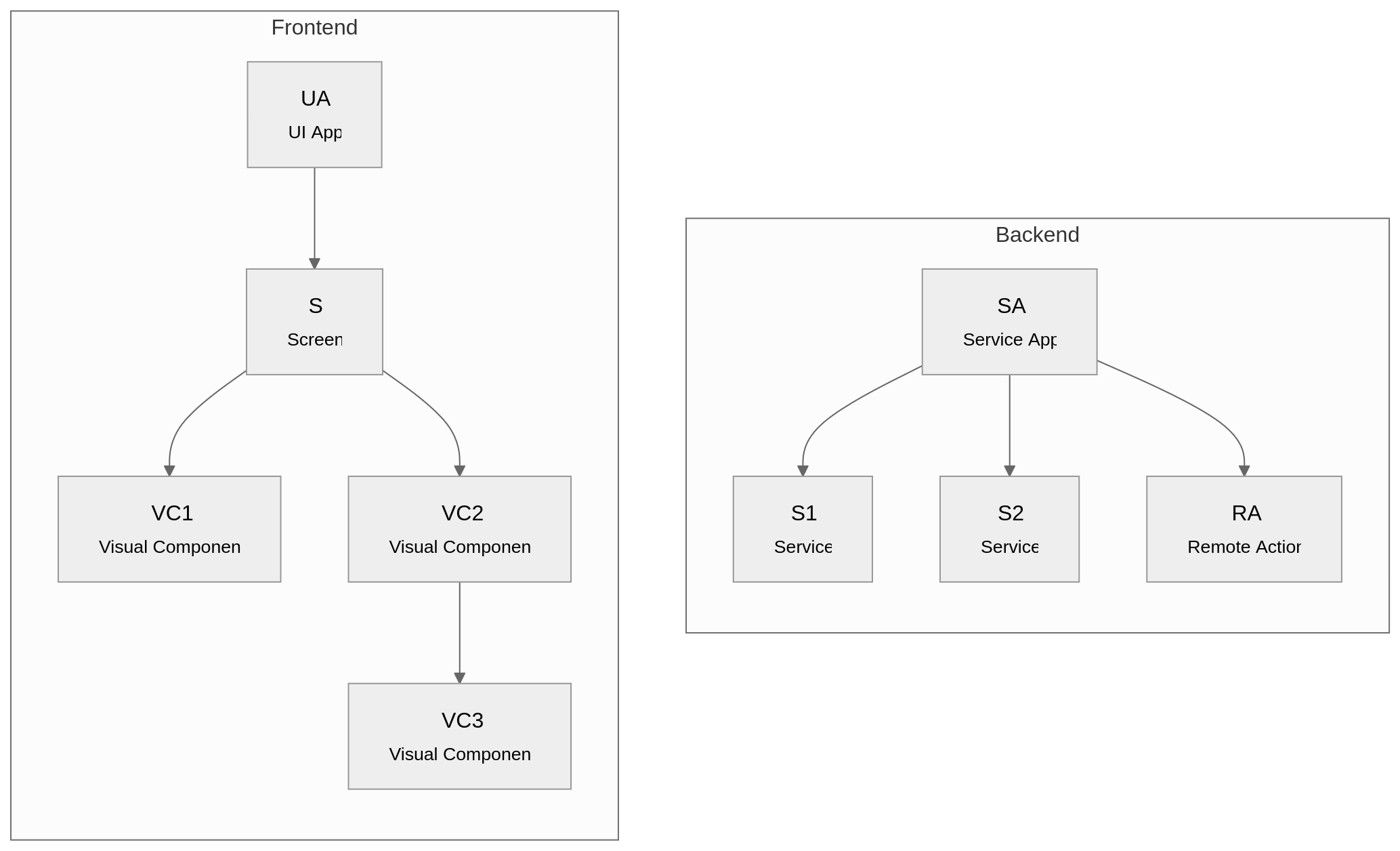
(some texts are cropped in the schemas, sorry for that)
On the left we have a frontend app tree:
- UA of type UI App which contains:
- S of type Screen which contains:
- VC1 of type Visual Component
- VC2 of type Visual Component which contains:
- VC3 of type Visual Component
- S of type Screen which contains:
On the right we have a backend app tree:
- SA of type Service App which contains:
- S1 of type Service
- S2 of type Service
- RA of type Remote Action
Issues with On Load
Before talking about Init Flow and Ready Flow, we need to understand why we needed these new addition in the first place.
Since the start of DRAW we have the On Load, which executes its logic when a brick enters the context tree. It looks like this in our schema:
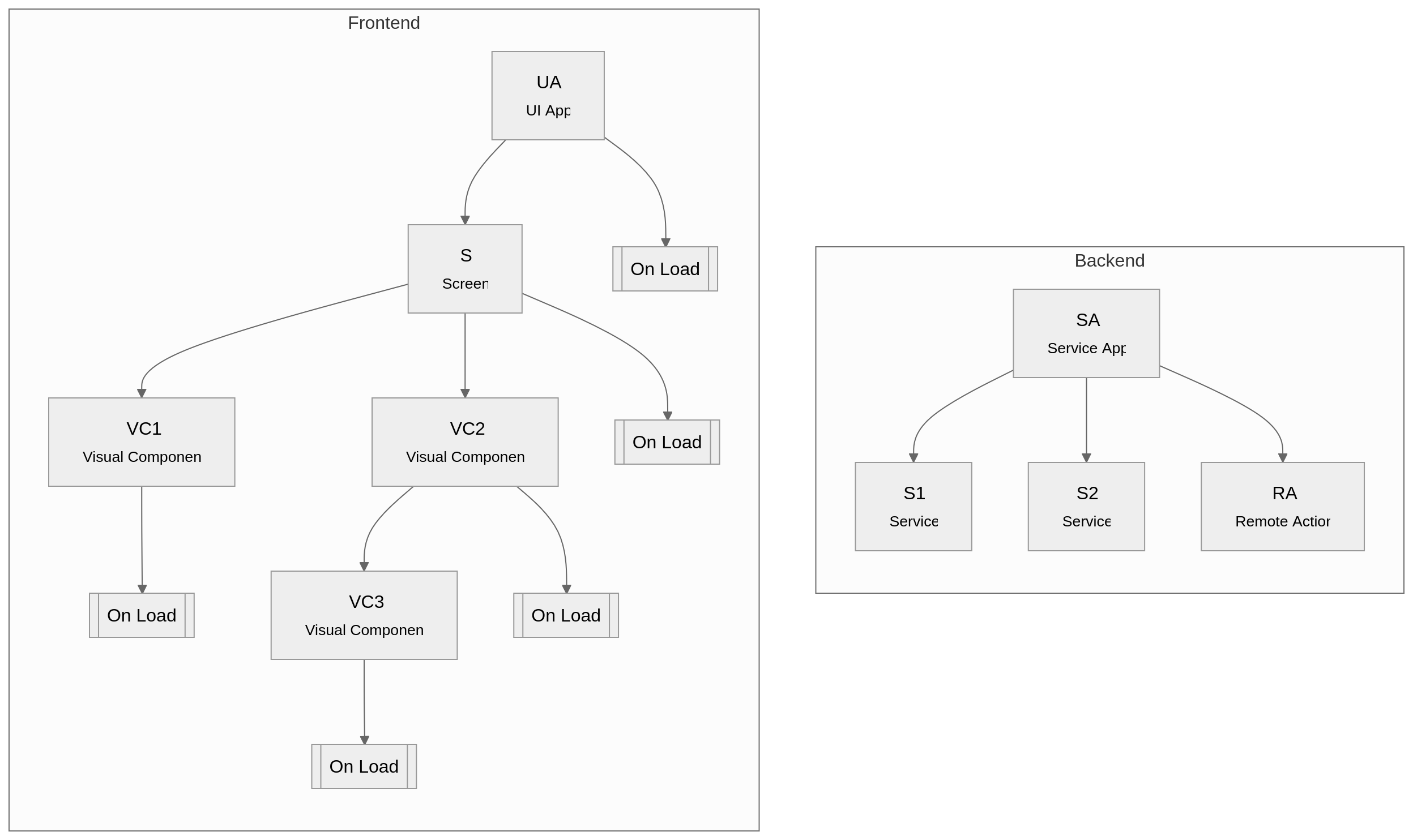
(Service App has no concept of On Load in DRAW)
So for example, when S is created it...
- ...adds its own children to the tree: VC1 and VC2
- ...executes its On Load logic
This works well if there is no dependency between S.onLoad and S's children, or if we don't care about the execution order of all the On Load.
However we have this main drawback:
- The execution order between each On Load and each children bricks is not deterministic
- S.onLoad could execute before UA.onLoad, and this could change between each execution
- The children of S could be executed before S.onLoad, or the contrary
So while On Load is great on its own, it doesn't allow the developer to control the flow of execution. And also leads to complex workarounds due to this hidden complexity, especially when there are dependencies in the context tree.
All those reasons lead to the decision that we need ways to better handle those situations.
Control initialization with Init Flow
The Init Flow allows to control the initialization phase of each brick in the context tree, using effectively a top-down approach. Here we can see how it looks in our example:
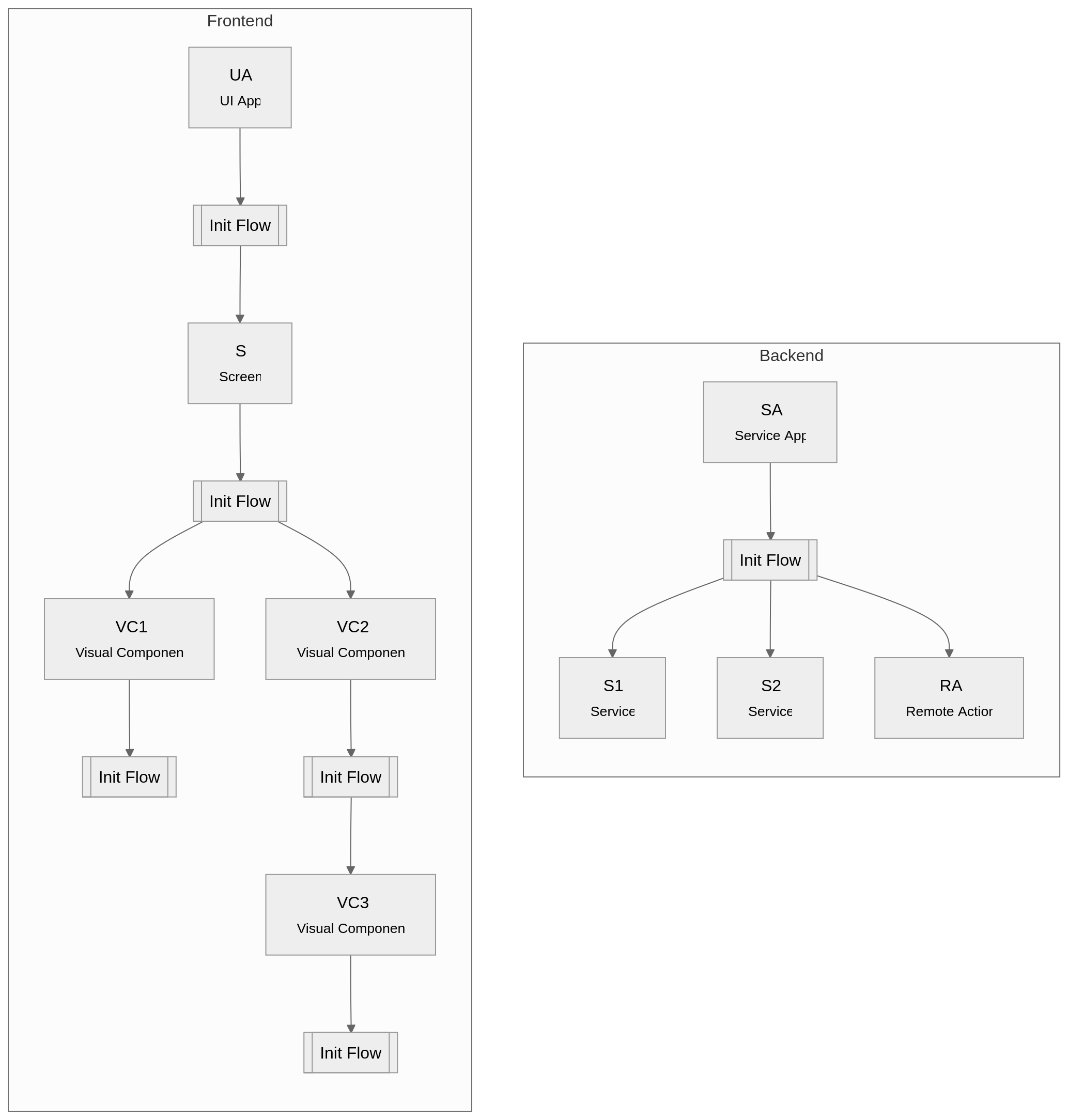
Here is the step-by-step:
- UA is started
- UA.initFlow is executed
- S is started
- S.initFlow is executed
- VC1 is started
- VC1.initFlow is executed
- VC2 is started
- VC2.initFlow is executed
- VC3 is started
- VC3.initFlow is executed
- VC3 is started
- VC2.initFlow is executed
- VC1 is started
- S.initFlow is executed
- S is started
- UA.initFlow is executed
And for the Service App:
- SA is started
- SA.initFlow is executed
- S1 is started
- S2 is started
- RA is started
- SA.initFlow is executed
We can see that we are sure that the Init Flow executed before any children is even added, allowing to execute logic at that specific moment in the application/screen/component startup.
Common use-cases
Here are some examples where Init Flow can be useful:
- User permissions check in an important Visual Component or Screen
- Screen routing in the UI App
- Mandatory initialization needed by children:
- e.g.: Secrets manager used in Service or Remote Action
- Analytics event at that specific moment
Execute post-processes with Ready Flow
While Init Flow has a top-down approach, Ready Flow is the exact opposite with a bottom-up approach. This means that the Ready Flow of a brick is executed only when all its children Ready Flow are finished. It gives this schema:
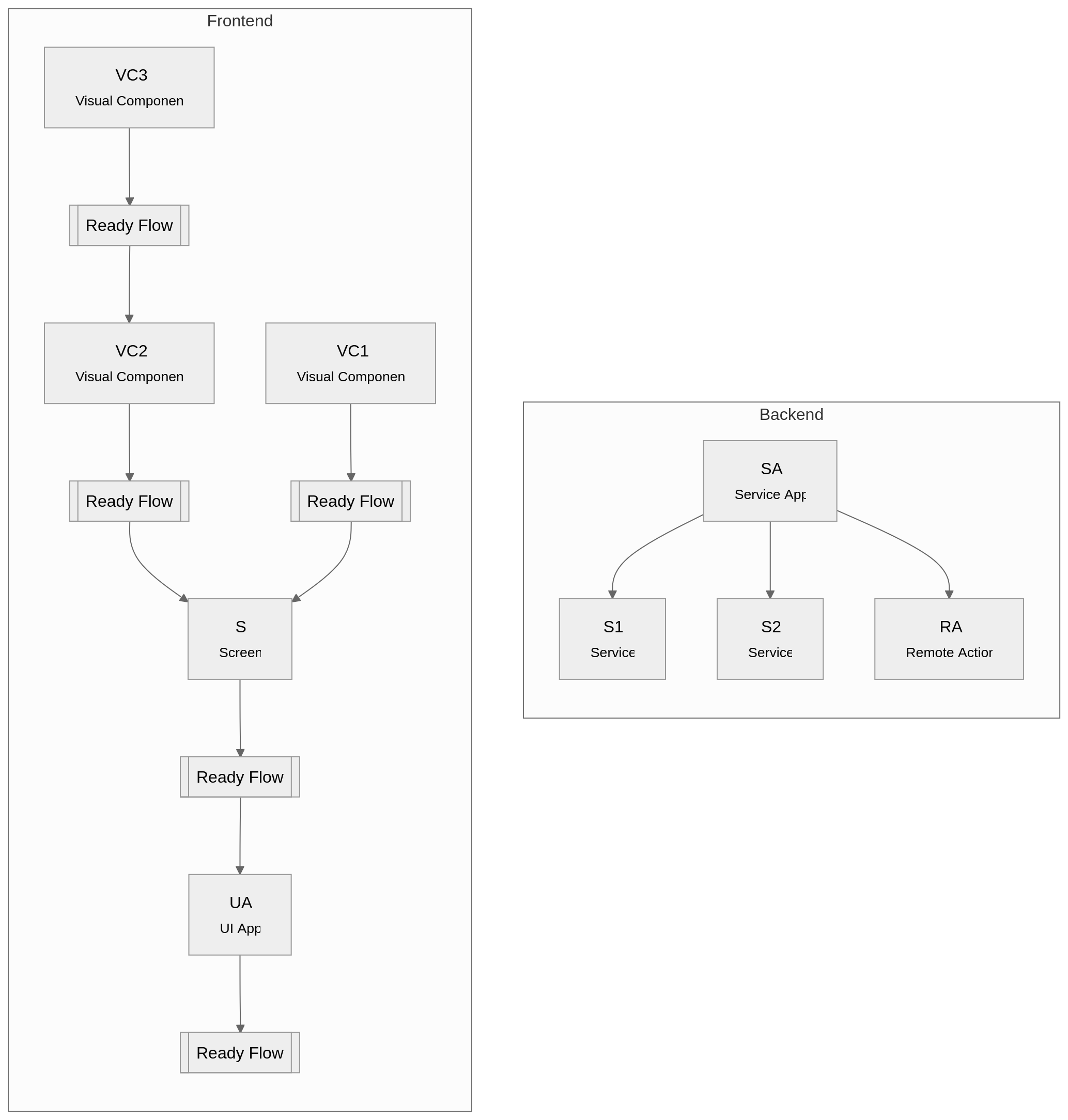
(Service App has no need for a Ready Flow)
Here is the step-by-step:
- VC1.readyFlow is executed
- VC3.readyFlow is executed
- VC2.readyFlow is executed
- S.readyFlow is executed
- UA.readyFlow is executed
- S.readyFlow is executed
- VC2.readyFlow is executed
To resume, a Ready Flow is only called once all the children are started and their Ready Flow are finished. Which allows to execute logic only when the context sub-tree is available.
In most cases, the Ready Flow is the best choice. Especially if you interact with children of the component.
Common use-cases
Here are some examples where Ready Flow can be useful:
- Allow the usage of the brick Set UI Property without any issue
- Custom animation of a component in a screen
- Basically any interaction with a children brick
- Analytics event at that specific moment
Flows definition
The Init/Ready Flow has a simple definition:
- An input Control Flow to start
- An output Control Flow to tell that the execution flow can continue
- An optional output Error Flow in case you can have errors
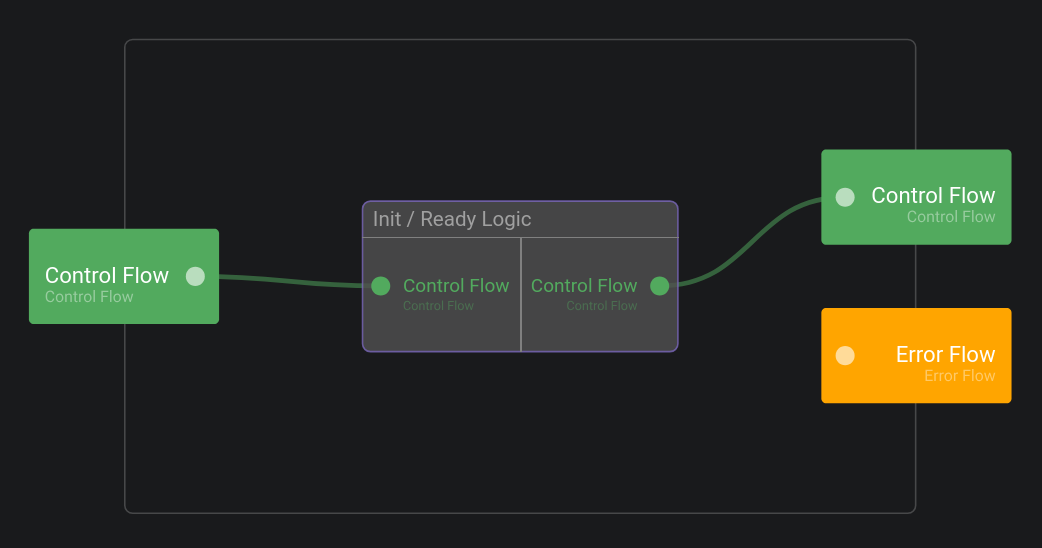
The important thing to remember is to make sure that the output Control Flow is triggered, otherwise the execution flow will simply hang.
Configuration
To avoid unnoticed hanging flows, there is a default timeout of 5 sec in case the output Control Flow is not triggered in time. This will log a warning, but can optionally throw an error if this is better suited to your need.
The following parameters allows to control those behaviors:
sc.initFlowTimeoutdefines the timeout value of all Init Flow (default value:5000, type: number, unit: millisecond)sc.readyFlowTimeoutdefines the timeout value of all Ready Flow (default value:5000, type: number, unit: millisecond)sc.initFlowTimeoutAsExceptiondefines if the timeout should throw an error instead of just a warning log (default value:false, type: boolean)sc.readyFlowTimeoutAsExceptiondefines if the timeout should throw an error instead of just a warning log (default value:false, type: boolean)
Migrating from On Load
On Load is kept in DRAW but marked as deprecated. This is because it is widely used, and migrating it automatically would be impossible as its behavior is different from the newly defined flows.
We only recommand to use the new flows if your application needs it, and for all new bricks too.
To migrate an On Load as-is, and to be as close to its behavior. Take its logic:
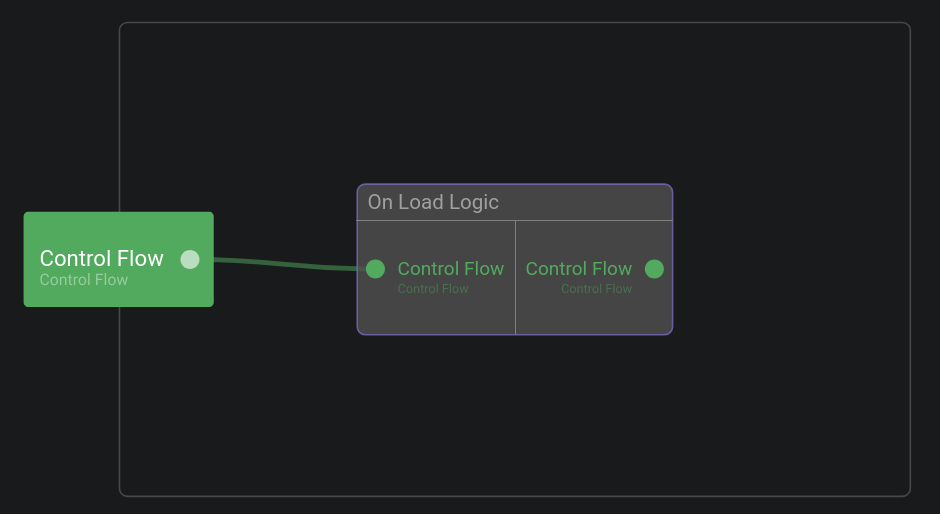
And put it in a Init Flow, with the output Control Flow piped like this:
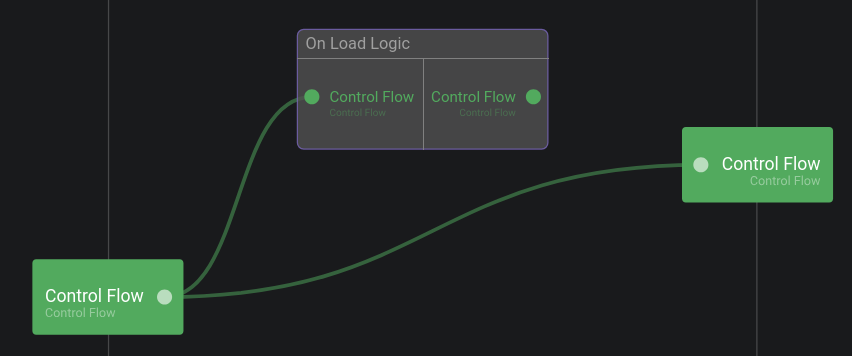
However we recommand to take a case-by-case approach and migrate one-by-one your On Load into Init Flow and Ready Flow, depending on the semantic required.
In most cases, the Ready Flow is the best choice. Especially if you interact with children of the component.